
Customer Experience
Zoho FSM
Product Overview
Digitize and Automate Your Entire Field Service Operation
For businesses that provide installation, maintenance, inspections, repairs, or onsite services, customer satisfaction depends on more than technical expertise. It depends on arriving on time, assigning the right technician, completing work efficiently, and keeping customers informed every step of the way.
When field operations are coordinated through phone calls, WhatsApp messages, spreadsheets, or paper job cards, scheduling conflicts, delayed service, poor communication, and incomplete records become common challenges.
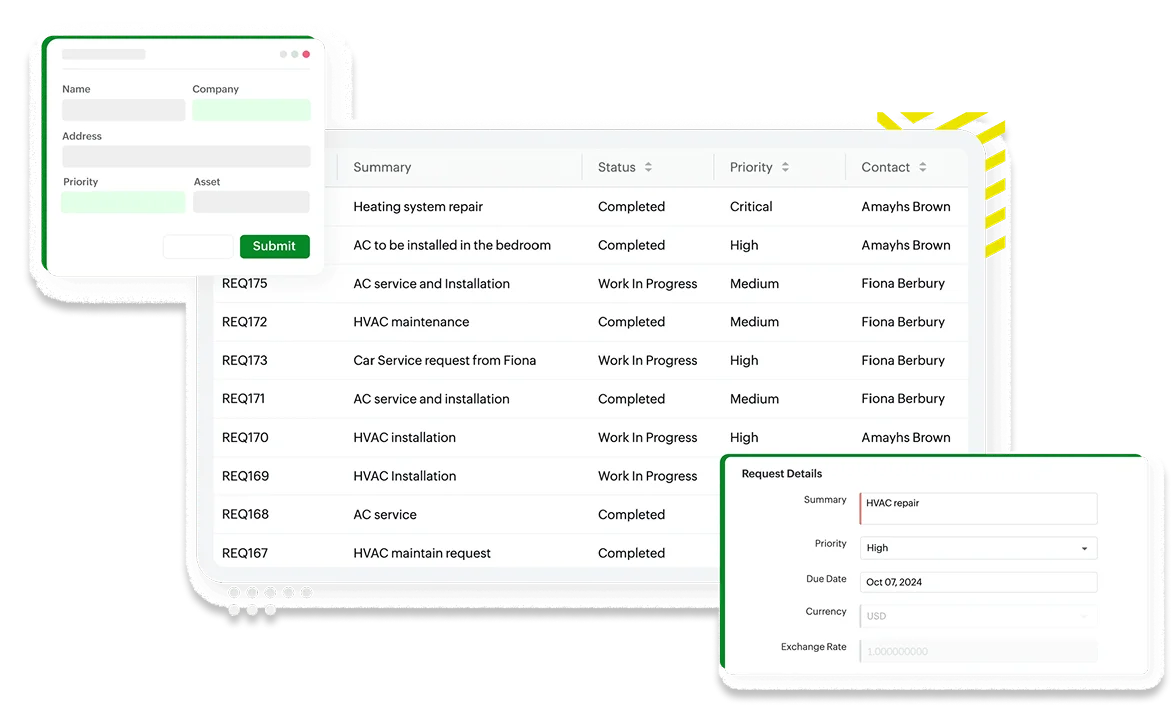
Zoho FSM helps businesses digitize and automate their entire field service operation—from work order creation and technician scheduling to customer communication, job completion, invoicing, and performance reporting.
Whether you manage a team of five technicians or hundreds of field engineers across multiple locations, Zoho FSM helps you deliver faster, more professional, and more profitable service.
One Platform for Your Office, Dispatch, and Field Teams
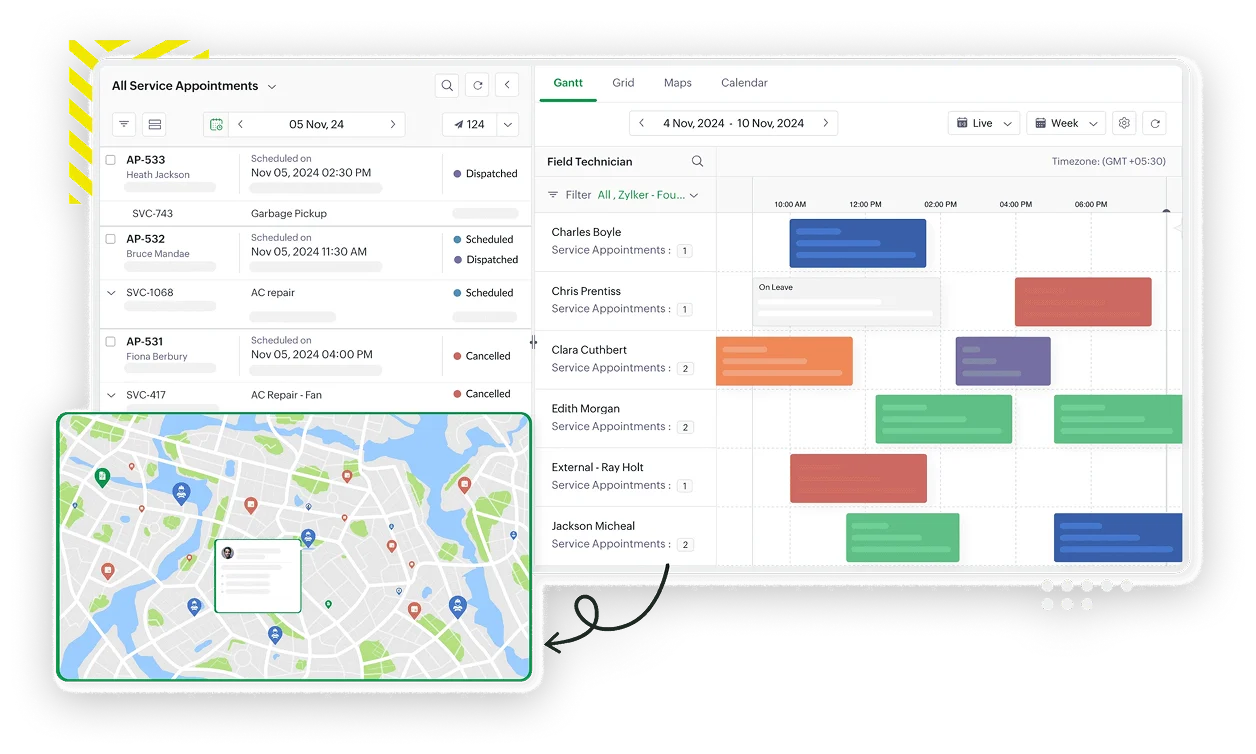
Zoho FSM is a cloud based Field Service Management solution that enables organizations to efficiently manage onsite service operations through intelligent scheduling, work order management, technician dispatch, mobile field service, inventory tracking, and customer communication.
It connects your office staff, dispatch coordinators, field technicians, and customers on one platform, ensuring every service request is tracked from assignment to completion.
Unlike generic scheduling tools, Zoho FSM is purpose built for organizations that rely on mobile field teams, providing real time visibility into technician activities, customer appointments, service history, and operational performance.
It is ideal for service providers across industries such as engineering, HVAC, facility management, security systems, telecommunications, healthcare equipment, utilities, manufacturing, renewable energy, and maintenance services.
Why Businesses Choose Zoho FSM
Organizations implement Zoho FSM when they want to:
- Improve technician scheduling and dispatch.
- Reduce missed appointments and service delays.
- Increase first time fix rates.
- Provide customers with real time service updates.
- Digitize field operations and eliminate paper job sheets.
- Improve visibility into field service performance.
Key Features
Powerful Capabilities for Every Service Operation
- Work Order Management
Create, assign, monitor, and manage service requests from initial customer enquiry through job completion.
Business Benefit
Ensure every service request is properly tracked and completed without manual coordination.
- Intelligent Scheduling & Dispatch
Assign the right technician based on skills, availability, territory, workload, or proximity to the customer.
Business Benefit
Reduce travel time, improve resource utilization, and increase the number of jobs completed each day.
- Mobile App for Field Technicians
Enable technicians to receive work orders, navigate to customer locations, capture service notes, upload photos, collect signatures, and update job status directly from their mobile devices.
Business Benefit
Keep field teams connected while eliminating paper based service reports.
- Customer Appointment Management
Schedule customer appointments, send automated confirmations and reminders, and provide customers with updates throughout the service process.
Business Benefit
Reduce missed appointments while improving customer confidence and communication.
- Asset & Service History Tracking
Maintain detailed records of customer equipment, service history, maintenance schedules, warranties, and previous work performed.
Business Benefit
Help technicians resolve issues faster by providing complete service history before every visit.
- Parts & Inventory Management
Track spare parts, consumables, and materials used during service visits while monitoring inventory availability.
Business Benefit
Reduce repeat visits caused by unavailable parts and improve inventory control.
- Workflow Automation
Automate work order creation, technician assignment, notifications, approvals, follow-ups, and service completion processes.
Business Benefit
Improve operational efficiency while reducing manual administrative work.
- Field Service Analytics
Monitor technician productivity, response times, travel time, first-time fix rates, service completion, customer satisfaction, and operational performance.
Business Benefit
Identify opportunities to improve efficiency and service quality through real time reporting.
Common Business Scenarios
Is Zoho FSM Right for You?
Zoho FSM is ideal for organizations experiencing challenges such as:
Field Technicians Are Scheduled Manually
Dispatchers coordinate jobs using spreadsheets, phone calls, or WhatsApp, making it difficult to optimize technician schedules and respond to urgent requests.
Customers Frequently Ask for Service Updates
Customers have limited visibility into appointment times, technician arrivals, or work progress, resulting in frequent follow up calls and reduced satisfaction.
Paper Job Cards Slow Down Operations
Technicians complete paper service reports that must be manually entered into office systems, delaying invoicing and reducing data accuracy.
Service History Is Difficult to Access
Technicians arrive onsite without visibility into previous repairs, installed equipment, or maintenance history.
Management Needs Better Operational Visibility
Leadership wants to monitor technician utilization, service response times, job completion rates, and overall field service performance.
Business Benefits
Measurable Improvements Across Your Organization
Improves Technician Scheduling and Dispatch
Assign the right technician to the right job based on skills, availability, and proximity—eliminating scheduling conflicts and manual coordination.
Increases First Time Fix Rates
Equip technicians with complete service history, asset information, and parts availability before every visit to resolve issues on the first appointment.
Reduces Travel Time and Operational Costs
Optimize routes and territories to minimize drive time, reduce fuel costs, and increase the number of jobs completed each day.
Enhances Customer Communication and Service Experience
Keep customers informed with automated appointment confirmations, technician updates, and service notifications throughout the process.
Digitizes Field Operations and Service Reporting
Replace paper job cards with digital service reports, photos, signatures, and real time status updates captured directly from the field.
Improves Visibility into Technician Productivity
Monitor response times, job completion rates, travel time, and technician utilization through real time dashboards and analytics.
Accelerates Service Completion and Invoicing
Complete work orders digitally in the field and trigger invoicing immediately—reducing billing cycles and improving cash flow.
Supports Scalable Field Service Operations
Grow your field team with confidence knowing scheduling, dispatch, and reporting processes scale seamlessly with your business.
Why Excellium
Why Implement Zoho FSM with Excellium?
A successful field service implementation requires more than deploying software. It requires designing service processes that connect your office operations, field teams, inventory, and customer communications into one efficient workflow. At Excellium, we work with your operations, service, and engineering teams to configure Zoho FSM around the way your business delivers onsite services.
Field Service Process Discovery
We assess your current service workflows, technician scheduling, dispatch processes, service agreements, and reporting requirements to design an optimized field service solution.
Solution Configuration
We configure work order types, service territories, technician profiles, scheduling rules, workflows, approval processes, appointment management, and customer notifications.
Mobile Workforce Enablement
We configure and deploy the Zoho FSM mobile application, ensuring technicians can receive assignments, update work orders, capture service information, and complete jobs efficiently while in the field.
User Training
We provide hands on training for dispatchers, service coordinators, technicians, supervisors, and administrators to ensure successful adoption across your organization.
System Integrations
We integrate Zoho FSM with Zoho CRM, Zoho Desk, Zoho Books, Zoho Inventory, Zoho Analytics, ERP systems, and other business applications to create a seamless service operation.
Ongoing Support & Optimization
Following implementation, Excellium provides continuous support, workflow optimization, reporting enhancements, and advisory services to help you maximize the value of your field service operation.
Frequently Asked Questions
Questions About Zoho FSM?
What is Zoho FSM used for?
Zoho FSM is a Field Service Management solution that helps businesses manage work orders, technician scheduling, dispatch, onsite service delivery, maintenance operations, and customer appointments.
Which businesses benefit most from Zoho FSM?
Zoho FSM is ideal for organizations that perform onsite installations, maintenance, inspections, repairs, technical support, equipment servicing, or any field-based operations.
Can technicians use Zoho FSM while working onsite?
Yes. Technicians can access work orders, customer information, service history, navigation, job notes, photos, signatures, and status updates using the Zoho FSM mobile application.
Can Zoho FSM integrate with Zoho CRM?
Yes. Zoho FSM integrates seamlessly with Zoho CRM, allowing sales, customer service, and field operations to share customer information and service history across the organization.
Can customers receive appointment notifications?
Absolutely. Zoho FSM can automatically send appointment confirmations, reminders, technician updates, and service notifications to improve customer communication.
Can Zoho FSM integrate with accounting and inventory systems?
Yes. Zoho FSM integrates with Zoho Books, Zoho Inventory, ERP solutions, and other business systems to support invoicing, inventory management, and operational reporting.
How long does implementation take?
Implementation timelines vary depending on service complexity, workflow requirements, integrations, mobile deployment, and data setup. Excellium develops a tailored implementation plan based on your operational needs.
Transform Your Field Service Operations
Deliver faster response times, improve technician productivity, and provide exceptional onsite customer service with Zoho FSM. Partner with Excellium to digitize your field operations and create a smarter, more connected service organization.